

You’ve written and revised your manuscript, and maybe even designed a cover. You’re getting closer to publication, and now it’s time to prepare the interior.
It sounds like the easy part. But as a book formatter, I can tell you it’s where many self-published books quietly lose their credibility.
Readers may never be able to name what’s wrong. They just sense that a book feels off, and that impression colors how they judge the writing itself.
The good news is that most formatting problems follow predictable patterns. Here are seven mistakes I see most often, and how to avoid each one.
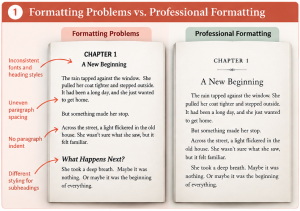
1. Using Inconsistent Fonts and Formatting
One of the most noticeable signs of an improperly formatted book is inconsistency.
One chapter might begin with a large heading while another uses a smaller one. Paragraph spacing may change throughout the manuscript, or different fonts may appear without a clear purpose. Some headings may be bold while others are italicized, even though they serve the same function.
These inconsistencies can make a book feel unfinished.
How to avoid it: Establish a consistent style for body text, chapter titles, subheadings, quotations, lists, and other recurring elements. Use paragraph and character styles in your layout software to maintain consistency throughout the book.
A well-formatted book should feel cohesive from the first page to the last.
2. Choosing the Wrong Font or Font Size
Typography affects how comfortably readers can move through a book.
A decorative font might look attractive on a cover, but it may be difficult to read across several hundred pages. Likewise, a font that works beautifully for a heading may not be suitable for body text.
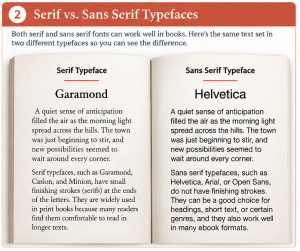
Font size matters, too. Typical body font sizes are roughly 10.5-12 pt, depending on the typeface and trim size. Text that is too small can strain readers’ eyes, while unnecessarily large text can make the book feel awkward and increase the page count.
How to avoid it: Choose typefaces that suit your book’s genre, audience, and tone. For many print books, a readable serif typeface (Garamond, Caslon, Minion, etc.) is a good starting point for body text, although sans serif fonts can work well in many contexts, too.
Always review a sample of the formatted pages at their intended print size. What looks comfortable on a computer screen may feel quite different in a physical book.
3. Ignoring Margins and the Inside Gutter
Margins aren’t simply empty space around your text. They help create a comfortable reading experience and ensure that the text remains visible when the book is bound.
One common mistake is using the same margin on every side without considering the book’s binding. The inside margin, often called the gutter, needs sufficient space so that text doesn’t disappear into the spine.
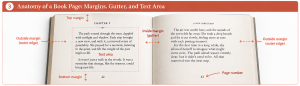
If the inside margin is too narrow, readers may have to force the book open or struggle to read text close to the binding. Margins that are too large, on the other hand, can waste space and unnecessarily increase the page count.
How to avoid it: Set margins based on the trim size, binding method, and final page count. Follow your printer’s current specifications, including any minimum margin and gutter requirements. For more information about Amazon KDP’s advice on margins, visit https://kdp.amazon.com/en_US/help/topic/GVBQ3CMEQW3W2VL6#margins.
Remember that the ideal margins for a short paperback may differ from a 500-page book.
4. Leaving Too Much or Too Little White Space
White space is an important part of good book design. It gives the text room to breathe and helps readers navigate the page.
Problems arise when spacing is applied inconsistently or without a clear design purpose.
For example, adding a blank line between every paragraph can make a book look like a typed manuscript or a web page rather than a published book, where traditional paragraph formatting is more appropriate. Conversely, packing too much text onto a page can make reading feel tiring.
Short paragraphs, poetry, dialogue, and memoir may call for different treatments. The goal isn’t to eliminate white space but to use it intentionally.
How to avoid it: Establish consistent paragraph indents, paragraph spacing, line spacing, and spacing around headings. Choose a layout that suits the content and maintains a comfortable reading rhythm.
There isn’t one paragraph style that works for every book. The right approach depends on the writing, the genre, and the author’s design preferences.
5. Overlooking Awkward Page Breaks
Even a manuscript with excellent writing can look unprofessional when its text breaks in inconvenient places.
Common problems include:
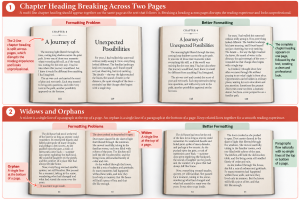
- A chapter heading stranded at the bottom of a page.
- A heading separated from the paragraph that follows it.
- A single line of a paragraph appearing at the top or bottom of a page (known as widows and orphans) when the rest of the paragraph is on the opposite page.
- A new chapter beginning mid-page when your design calls for chapters to start on a fresh page (or a right-hand page).
- Large, unexplained gaps caused by manual page breaks or spacing inserted to force text into position.
These issues interrupt the reading experience and can make a book look as though it hasn’t received a final review.
How to avoid it: Use appropriate paragraph controls and page-break settings in your layout software. Review chapter openings, section breaks, and page transitions throughout the book. Correct awkward breaks without introducing new spacing problems elsewhere.
This is one reason a final page-by-page review matters.
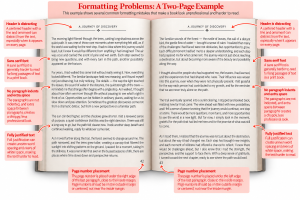
6. Forgetting the Details That Make a Book Look Finished
Small details can have a surprisingly large effect on a book’s overall appearance.
Page numbers might be missing from some pages or positioned inconsistently. Running headers may appear where they shouldn’t, such as on a chapter-opening page. A table might extend beyond the text area, or a photograph may look blurry when printed.
Other details include inconsistent quotation marks, poorly aligned lists, widows and orphans, and illustrations that don’t fit comfortably within the margins.
Individually, some of these problems may seem minor. Together, they can make the book feel less polished.
How to avoid it: Create a checklist for the final review. Check page numbering, running headers, chapter openings, tables, illustrations, captions, lists, and other special elements. Make sure images have sufficient resolution for their intended print size.
Don’t assume that because the text is correct, the pages are ready for publication.
7. Treating the Print-Ready PDF as an Afterthought
A book that looks good in your layout software isn’t necessarily ready to upload to a publishing platform.
The exported PDF needs to meet the printer’s specifications. Depending on the printer and the book’s design, considerations may include the correct page size, font embedding, image quality, color settings, and bleed for elements that extend to the edge of a page. For many print-on-demand interiors, bleed extends 0.125 inches beyond the trim edge at the top, bottom, and outside edge of the page. Always confirm the specifications for your chosen printer.
An incorrectly prepared file can lead to upload errors, production problems, or unexpected results in the printed book.
How to avoid it: Export your PDF using settings appropriate for the intended printer. Check the requirements for your chosen publishing platform, such as Amazon KDP or IngramSpark, rather than assuming that one PDF preset works for every service.
After exporting, inspect the actual PDF—not just the original layout document. Review it from beginning to end and use any available preflight or file-validation tools before uploading it.
A Few More Problems Worth Watching For
The seven mistakes above aren’t the only things to check before publishing. Here are a few more items to include in your final review:
- Skipping the printed proof. Order a physical proof copy before approving your book. Review the margins, gutter, image quality, and overall appearance in print.
- Using tabs or extra spaces for indents. Use paragraph styles to control indentation rather than tabs or repeated spaces, which can cause problems in layout software and ebooks.
- Ignoring facing-page conventions. Decide whether chapters should begin on right-hand pages and establish the placement of front matter elements before finalizing your layout.
- Overlooking front and back matter. Check that your book includes the appropriate opening and closing pages, such as a title page, copyright page, table of contents, acknowledgments, or author bio, as applicable.
- Neglecting justification and hyphenation. If you use justified text, check for excessive gaps between words and distracting white-space patterns, sometimes called rivers, running down the page.
- Forgetting the ebook version. If you’re publishing an ebook, remember that print formatting doesn’t transfer directly. Reflowable EPUB files require different formatting considerations because text adjusts to different screens and reader settings.
Before You Publish, Take One More Look
Book formatting is about more than making words fit on a page. It’s about creating a reading experience that feels comfortable, consistent, and appropriate for the content.
Before submitting your book for publication, ask yourself:
- Are fonts, headings, and paragraph styles consistent?
- Are margins and gutters appropriate for the book’s trim size and page count?
- Is spacing used intentionally and consistently?
- Do chapter openings and page breaks look right?
- Are page numbers, headers, images, and other details correct?
- Does the exported PDF meet the printer’s requirements?
A careful final review can catch many problems before they become costly production mistakes.
Your manuscript represents months, or years, of hard work. Your book’s interior should reflect that care.
If you’d rather spend your time writing than wrestling with margins, styles, and printer specs, I’d be glad to help. I format print and ebook interiors for independent authors, so your book looks professional on every page and every device.
Explore our book formatting services →
This article was developed with the assistance of AI and reviewed, edited, and expanded by BookLayoutPro.