

Amazon KDP keywords are often misunderstood in self‑publishing. Authors either come up with them on the fly while uploading their books, overthink them, or try to improve their rankings with keyword stuffing. But keywords aren’t magic—they’re simply signals that help Amazon understand who your book is for and where it should appear in search results.
The good news: well-chosen keywords can help improve your book’s visibility by giving Amazon more information about its content and the readers who may be looking for it.
What KDP Keywords Actually Do
KDP gives you seven keyword fields (keywords or short phrases) that help Amazon:
- Understand more about your book’s content
- Match your book with relevant reader searches
- Determine how and where your book may appear in Amazon’s store
Keywords do not guarantee ranking. They simply help Amazon classify your book better.
Three Types of Keywords to Consider
There are three keyword types you might consider as you pull your keyword list together:
- Audience: Who is the book for? (“homeschool science workbook,” “Christian women’s devotional”).
- Need or topic: What does the reader want to learn, solve, or explore? (“meal prep for beginners,” “decluttering small spaces”).
- Book-specific description: What distinctive elements describe the book? For fiction, this might include setting, character type, plot theme, or tone. (“Colonial America,” “female amateur sleuth,” “second chance romance,” “feel-good family saga”).
Thinking in these three areas can help you develop a more focused list of potential keywords.
How to Brainstorm Keywords Without Guessing
Here’s a simple workflow that works for both fiction and nonfiction.
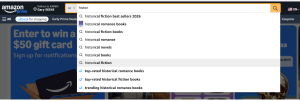
- Start with Amazon’s own search bar
As you type your book’s topic into the search bar, Amazon provides automatic suggestions that give you clues about what readers are using when searching.
- Look at the top 10 books in your category
Check their titles, subtitles, and descriptions. You’ll see patterns in the language readers respond to.
- Identify the “intent” behind your book
Ask yourself: What is the reader trying to accomplish? Examples:
- Learn something
- Escape into a story
- Solve a problem
- Improve a skill
- Feel inspired
Thinking about reader intent can help you move beyond broad, generic terms.
What NOT to Use as KDP Keywords
Amazon is clear about several keyword restrictions. Be sure to avoid these:
- Information covered in your book’s metadata, such as title, subtitle, or contributors
- Claims about quality, such as “best fiction book,” or time-sensitive statements like “on sale now”
- Spelling errors
- Names of authors not associated with your book
There are others. For more information, visit https://kdp.amazon.com/en_US/help/topic/G201298500#keywordsavoid.
Don’t use your seven keyword fields simply to repeat your title, subtitle, author name, or category selections. Use them to give Amazon additional relevant information about your book.
How to Format Your Keywords Correctly
KDP allows both individual words and short phrases. Amazon recommends choosing specific, relevant terms and combining words in a logical order when they naturally form a phrase readers might search for. Examples might include guided journal for anxiety or cozy mystery with cats. No commas or quotation marks are needed.
Examples of Strong Keyword Sets
Below are sample keyword sets for different genres. These examples are meant to show the kinds of phrases you might consider…not keywords that will work for every book.
Nonfiction: Decluttering & Home Organization
- “decluttering for busy moms”
- “minimalist home organization”
- “how to simplify your life”
- “room‑by‑room decluttering guide”
- “organizing small spaces”
- “beginner decluttering plan”
- “stop feeling overwhelmed at home”
Fiction: Cozy Mystery
- “small town cozy mystery series”
- “cat detective mystery”
- “clean mystery with humor”
- “lighthearted whodunit”
- “culinary cozy mystery”
- “female amateur sleuth”
Children’s Book: Ages 4–8
- “bedtime story for toddlers”
- “positive messages for kids”
- “read aloud picture book”
- “kindness and sharing story”
- “animal friends adventure”
- “gentle bedtime routine book”
- “short stories for preschoolers”
Notice that these examples go beyond basic genre labels and describe the audience, subject, tone, characters, or specific features of the book.
How Keywords and Categories Work Together
Your categories and keywords work together to help Amazon understand where your book belongs. You can select up to three categories when setting up your book, while keywords provide additional information about your subject, audience, setting, themes, characters, or other details.
If the exact category you’re looking for isn’t available, Amazon notes that relevant keywords can also help determine how your book is “shelved” in the Amazon store.
You Can Change Your Keywords Later
Keywords aren’t set in stone. You can update them after your book is published. If your original keywords aren’t producing relevant search results—or you discover better ways readers describe your book—you can revise them in your KDP book details and republish the update.
They Aren’t Magic; They Are Valuable Tools
Doing some simple research ahead of time and selecting keywords that reflect your book’s content and audience can help Amazon put your book in front of the right readers.
For up-to-date information on Amazon’s use of keywords, visit https://kdp.amazon.com/en_US/help/topic/G201298500
For information about BISAC subject codes, read Choosing the Right BISAC Codes for Your Book.